| ScanForm validation DSL — key concepts | |
| Concept / Parameter | Meaning |
|---|---|
| b.question(name, row, boxals_threshold_for_eligibility=N) | Registers a field for validation. The threshold N is the minimum number of filled boxes required for the field to be considered ‘active’ (i.e. the worker has started filling it in). |
| b.any_active(checked_groups, checked_groups_threshold=N, discard_criteria=[…]) | Defines row eligibility. A patient row is only validated if ≥N of the specified key fields are active AND no discard bubble is marked. This prevents false alerts on genuinely blank rows at the bottom of a page. |
| check__boxes__enough_filled | The field must have at least 1 filled box. Used to enforce required digit-box or date fields. |
| check__checkboxes__enough_answers + check__checkboxes__not_too_many_answers (paired) | Together these enforce exactly one oval bubble selected — used for mandatory single-select fields. |
| check__checkboxes__not_too_many_answers (alone) | At most one oval bubble may be selected. The field is optional, but if filled it must not have multiple ovals crossed — used for optional single-select fields. |
| PageNumberBlock(0) | Left page of the physical spread. |
| PageNumberBlock(1) | Right page of the physical spread. |
| Commented-out lines | Fields that exist on the paper form and are exported by OCR, but are not actively validated in-phone. They are available in the dataset but will not trigger an on-screen alert. |
In-Phone Validation
How in-phone validation works
When a field worker photographs a completed form page, ScanForm’s OCR engine reads the paper immediately and runs a set of automated checks before the data is submitted. If any check fails, the app displays an alert on-screen and prompts the worker to correct the paper form and retake the photo.
Important
This is fully automated, real-time validation — no human verifier is involved at this stage. The goal is to catch critical errors at the point of data capture, while the form is still in hand and corrections are still possible.
The validation logic is defined in data_validation.py using a Python DSL (ChecksBuilder). The sections below explain the key concepts, the eligibility rules, and every check applied to this form.
Core concepts
Eligibility rules
Before any field-level check is run, the system first determines whether a patient row is eligible for validation. This two-stage gate prevents spurious alerts on empty rows.
Page-level gate
A discard bubble (discard_page) is read once at page level. If it is marked, all 5 patient rows on both pages are skipped 014 no field checks are triggered at all.
Row-level gate
For each of the 5 patient rows, the system checks:
Note
A row is validated only if:
discard_pageis not marked, ANDdiscard_rowis not marked for that row, ANDAt least 3 of the following 12 key fields are active (i.e. have 2651 filled box or bubble):
tb_reg_date,tb_reg_number,participant_age,participant_age_unit,participant_sex,participant_risk,referral_source,treatment_regimen,disease_site,tb_history,how_diagnosed,hiv_status
The threshold of 3 out of 12 is deliberately generous 014 it means that even a partially completed row (e.g. only the date, number, and one oval filled) will trigger validation, while a completely blank row at the bottom of the page will not.
| Fields used in row eligibility assessment | |||
| ≥3 of these 12 fields must be active for validation to run on that row | |||
| Variable | Label | Eligibility Threshold | Notes |
|---|---|---|---|
| tb_reg_date | Registration Date | 2 | At least 2 boxes filled |
| tb_reg_number | TB Registration Number | 3 | At least 3 boxes filled |
| participant_age | Age | 1 (default) | Any fill |
| participant_age_unit | Y/M | 1 (default) | Any fill |
| participant_sex | Sex | 1 (default) | Any oval |
| participant_risk | Occupation / Risk Group | 2 | At least 2 boxes/ovals filled |
| referral_source | Referral | 2 | At least 2 boxes/ovals filled |
| treatment_regimen | Treatment Regimen | 1 (default) | Any oval |
| disease_site | Site of Disease | 1 (default) | Any oval |
| tb_history | Treatment History | 2 | At least 2 boxes/ovals filled |
| how_diagnosed | Bact/Cl Diagnosed | 1 (default) | Any oval |
| hiv_status | HIV Status | 1 (default) | Any oval |
Validated fields and checks
The table below lists every field-level check that runs in-phone. Checks are applied to each of the 5 patient rows independently.
| In-phone checks — all 26 validated fields | |||||
| Applied independently to each of the 5 patient rows per page | |||||
| Variable | Label | Page | Check Type | Rule | On Failure |
|---|---|---|---|---|---|
| tb_reg_date | Registration Date | 📱 Left | 📝 Required fill | ≥1 box filled | Alert: field is required |
| tb_reg_number | TB Registration Number | 📱 Left | 📝 Required fill | ≥1 box filled | Alert: field is required |
| participant_age | Age | 📱 Left | 📝 Required fill | ≥1 box filled | Alert: field is required |
| participant_age_unit | Y/M | 📱 Left | 📝 Required fill | ≥1 box filled | Alert: field is required |
| participant_sex | Sex | 📱 Left | ✅ Exactly one | Exactly 1 oval | Alert: exactly one option required |
| participant_risk | Occupation / Risk Group | 📱 Left | ✅ Exactly one | Exactly 1 oval | Alert: exactly one option required |
| referral_source | Referral | 📱 Left | ✅ Exactly one | Exactly 1 oval | Alert: exactly one option required |
| treatment_regimen | Treatment Regimen | 📱 Left | ✅ Exactly one | Exactly 1 oval | Alert: exactly one option required |
| disease_site | Site of Disease | 📱 Left | ✅ Exactly one | Exactly 1 oval | Alert: exactly one option required |
| tb_history | Treatment History | 📱 Left | ✅ Exactly one | Exactly 1 oval | Alert: exactly one option required |
| how_diagnosed | Bact/Cl Diagnosed | 📱 Left | ✅ Exactly one | Exactly 1 oval | Alert: exactly one option required |
| lam_result | LAM Result | 📱 Left | ⚠️ Max one | ≤1 oval | Alert: no more than one option |
| xpert_result | Xpert Result | 📱 Left | ⚠️ Max one | ≤1 oval | Alert: no more than one option |
| culture_result | Culture Result | 📱 Left | ⚠️ Max one | ≤1 oval | Alert: no more than one option |
| xray_result | XRay Result | 📱 Right | ⚠️ Max one | ≤1 oval | Alert: no more than one option |
| dst_result | DST Result | 📱 Right | ⚠️ Max one | ≤1 oval | Alert: no more than one option |
| second_line | Moved to 2nd Line Tx | 📱 Right | ⚠️ Max one | ≤1 oval | Alert: no more than one option |
| treat_outcome | Treatment Outcome | 📱 Right | ⚠️ Max one | ≤1 oval | Alert: no more than one option |
| adherence_support | DOT and Adherence Support | 📱 Right | ⚠️ Max one | ≤1 oval | Alert: no more than one option |
| hiv_status | HIV Status | 📱 Right | ✅ Exactly one | Exactly 1 oval | Alert: exactly one option required |
| hiv_test_time | HIV Test Time | 📱 Right | ⚠️ Max one | ≤1 oval | Alert: no more than one option |
| arv_status | ARV Start Time | 📱 Right | ⚠️ Max one | ≤1 oval | Alert: no more than one option |
| cpt_status | CPT Status | 📱 Right | ⚠️ Max one | ≤1 oval | Alert: no more than one option |
| enrolled_prp | Enrolled into PRP | 📱 Right | ⚠️ Max one | ≤1 oval | Alert: no more than one option |
| ptld_how_diagnosed | PTLD Diagnosis Method | 📱 Right | ⚠️ Max one | ≤1 oval | Alert: no more than one option |
| prp_outcome | PRP Outcome | 📱 Right | ⚠️ Max one | ≤1 oval | Alert: no more than one option |
Check types explained
| Three check types deployed in this form | |||
| Icon | Check Type | Fields Using | Description |
|---|---|---|---|
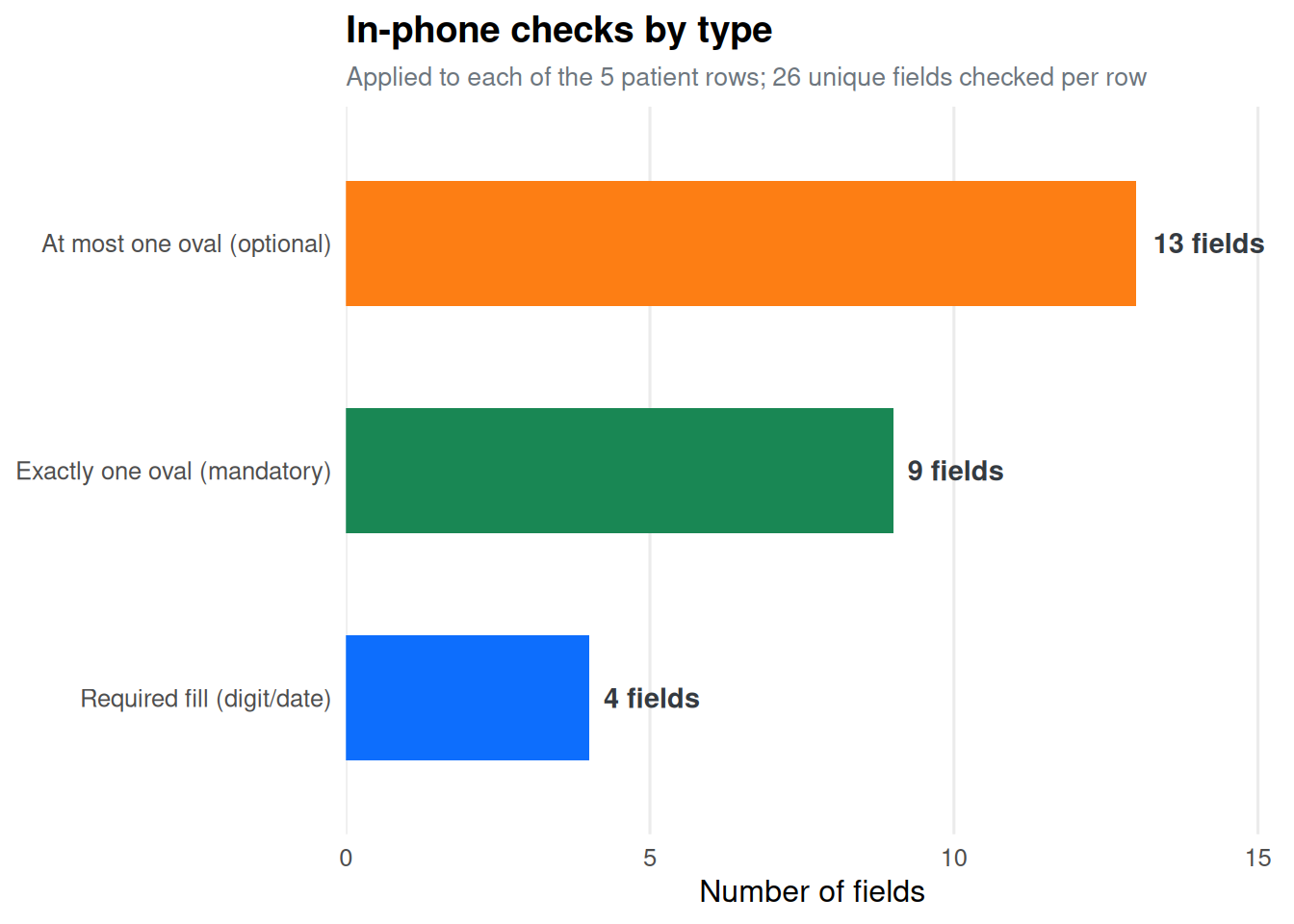
| 📝 Required fill | enough_filled | 4 | The field must have at least 1 filled box. Applies to digit-box and date fields that are mandatory. If the worker left the field blank on an otherwise active row, an alert fires immediately. |
| ✅ Exactly one | enough_answers + not_too_many | 9 | Both a lower and upper bound on the number of crossed ovals. Used for mandatory single-select questions. Fires if the field is blank (no oval crossed) OR if more than one oval is crossed. |
| ⚠️ Max one | not_too_many | 13 | Upper bound only. The field is optional, so leaving it blank is acceptable. However, if the worker crosses two or more ovals, an alert fires. Used for optional single-select questions. |
Fields not validated in-phone
Many fields on the form are registered in the OCR pipeline but are intentionally excluded from in-phone validation (shown as commented-out lines in data_validation.py). These fields are still OCR-processed and exported 014 they are simply not checked in real time.
Note
Exclusion from in-phone validation does not mean the data is ignored. These fields are fully exported and subject to pipeline-level checks (see the Data Pipeline tab) after submission.
| Fields present on form but excluded from in-phone validation | |
| All are still OCR-processed and available in the exported dataset | |
| Section | Fields / Ovals Not Validated In-Phone |
|---|---|
| Patient identity | participant_reg_id |
| Demographics | participant_sex (individual ovals: male, female) |
| Risk group | All 8 individual risk ovals (miners, ex_miners, mining_community, health_care_workers, prisoner, hh_contact, migrant, risk_other) |
| Referral | All 7 individual referral ovals (community, ncd, private, walk_in, opd, ward, art_referral) |
| Treatment | All 4 regimen ovals; treatment_regimen_other; all 2 disease_site ovals; all 6 tb_history ovals; all 2 how_diagnosed ovals |
| Initial lab dates | lam_date, smear_date, smear_result, smear_plus, xpert_date, culture_date |
| Initial lab results (individual ovals) | lam_result ovals, xpert_result ovals, culture_result ovals |
| Follow-up smears | smear_date_2/5/6, smear_result_2/5/6, smear_plus_2/5/6 (all fields and ovals) |
| Imaging & DST | xray_date, xray_result ovals, dst_date, dst_result ovals |
| Outcome | outcome_date; second_line ovals; treat_outcome ovals; adherence_support ovals |
| HIV / ART | hiv_status ovals; hiv_test_time ovals; arv_status ovals; arv_id; art_reg_id; cpt_status ovals; cpt_start_date |
| PRP / PTLD | enrolled_prp ovals; ptld_how_diagnosed ovals; prp_outcome ovals |
| Administrative | page_number, book_number, discard_row (checkbox), implementation_error, photo_taken |
Validation summary
Tip
26 fields are validated per patient row. With 5 rows per page, up to 130 individual checks may fire on a single page scan. The eligibility gate (2653 of 12 key fields active) ensures that only rows where a patient has genuinely been started trigger any checks.